

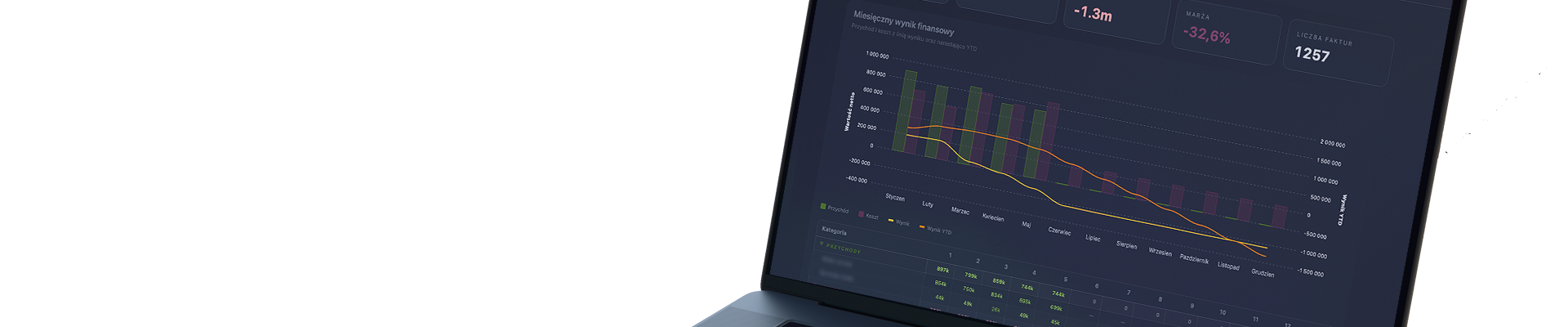
Clio is a data orchestration system for automatic data integration and reporting. When an employee approves data in a familiar spreadsheet, Clio takes control — it saves the data to a central database, compares it with the plan, detects deviations, and automatically generates reports, alerts, and dashboards for the entire company.
No exports. No manual merging. No extra work.
Problem — what the client was looking for
In most companies, every piece of information is entered at least twice.
The first time when the work is done — an invoice arrives, an order is fulfilled, a project starts.
The second time when someone has to report on that work. And it is this second entry that is invisible at first glance — because it doesn’t look like data entry. It looks like “making a report.”
Someone pulls data from several places. Merges it manually. Tries to understand why the numbers don’t match. Interprets what a detected deviation means. Formats it in a way that management can understand. Sends the file by email. And a week later does it all over again — because the data has already become outdated.
The effect is always the same. The manager doesn’t know which version of the file is current. The analyst doesn’t know which version management is working on. No one knows whether the data in last week’s presentation is still valid. The report that was supposed to provide answers itself becomes a question.
On top of that, there is a structural problem that most companies have never clearly named: the data for a single report lives in several places at once. The budget in the finance department’s Excel. Invoices in a separate spreadsheet. Operational data somewhere else. To create one summary, someone has to manually collect, merge, and verify everything. Every month. From scratch.
This is work that shouldn’t exist. Not because it’s unnecessary — conclusions are needed, interpretation is needed, a clear picture for management is needed. But this work shouldn’t require a person to manually glue three spreadsheets together just to start thinking.
Solution — what is Clio
Clio is a data orchestration and automated reporting system based on the Single Entry – Multi Output architecture.
One place to enter data. Multiple outputs — with no extra work.
The key design decision was to leave Excel where it is.
Not because Excel is the best possible tool, but because it is the tool people already use and in which they can build complex things. Financial models, budgets, complex calculations, sales plans — all of this is created in Excel and should remain there. Changing the interface means changing the habits of the entire organization. Clio does not require that change.
The principle is simple: the employee enters data in a familiar spreadsheet, approves it — and Clio takes control from that moment.
The data goes to a central MongoDB database, is processed, and feeds reports, dashboards, and alerts for the entire company. No retyping. No exports. No manual merging of presentations. Clio does not replace Excel — it makes Excel work more effectively for the entire organization.
Clio — the only system that is both Excel-friendly and management-friendly
Management wants up-to-date data, ready reports, and alerts when something requires attention. Employees want to work in a tool they know — and don’t want to do anything twice. These two requirements rarely align. Most systems solve one at the expense of the other.
Clio solves both. Data enters through the Excel the organization already uses. It exits as management reports, dashboards, alerts, and ready documents — automatically, without turning a person into a data connector.
Clio solves two fundamental problems at once.
Reporting — work results in spreadsheets stop living on one employee’s drive and start feeding reports across the entire organization.
Standardization — every report generated by Clio has the same format, the same structure, and reaches the right place, regardless of who entered the data and when.
Clio was not created as a product. It was created as an answer to specific questions.
The logic of the system is based on many years of experience in financial analysis for private investors and funds — in real estate projects, M&A transactions, operational profitability assessment, and investment scenario modeling.
This experience answered the question every reporting system should ask before writing the first line of code: what information actually changes decisions? What does management need to see to take action — and what only clutters the screen? When is a deviation a signal requiring reaction, and when is it just statistical noise?
Clio is the answer to these questions, enclosed in an architecture. Not a generic one — tailored to a specific company, specific process, and specific decision-making moment.
How Clio works — system architecture
Dedicated Excel application as an active data terminal
Origami Effect builds a personalized spreadsheet tailored to the company’s specific processes, equipped with a VBA or JavaScript layer that turns it into an active data terminal. The user works exactly as before. The system does the rest.
Central MongoDB database
A flexible NoSQL database that accepts data exactly as designed — without rigid schemas or structural limitations. Every record contains not only the value but also context: who entered it, when, and as part of which process. This is not a warehouse — it is an active engine that continuously monitors data according to defined rules and reacts when something requires attention.
Python analytical layer
Data from Excel is taken over by algorithms that generate analyses and visualizations unavailable in standard BI — density maps, violin plots, Tornado Charts, heatmaps, multi-dimensional scatter plots. Advanced visualization allows you to see in the data what a table will never show — where the market is concentrating, which variables have the greatest impact on the result, and how risk is distributed across scenarios.
Data flow orchestration
Clio manages the flow of information from the moment a number is entered into a cell until the final report. Data from different sources — spreadsheets, financial models, operational applications — are combined automatically without human involvement. Each source provides one thing: reliable, up-to-date data from its area. Clio assembles the whole.
Automatic report distribution
The finished document is automatically delivered to the right place — the right folder on SharePoint, the right file name with date and version, at the right time. According to schedule: daily, weekly, monthly, or triggered by an event. The end user doesn’t have to do anything. The report arrives by itself.
What Clio stores — a database that never sleeps
MongoDB is not a passive archive. Every record contains not only the value but also context — who entered it, when, as part of which process, based on what assumptions. What Clio collects determines how much can be extracted from that data.