
LeadFold · B2B Sales Automation
From scattered customer knowledge to a personalized offer — with AI agents, an MS Excel interface, and human approval of communications.
LeadFold brings company data, customer needs analysis, and sales material generation together in one process. Built with Python, the solution uses MS Excel as the team’s work interface for managing data, selecting products and services, and modifying AI prompts.
The system complements CRM, OneDrive, and existing tools instead of requiring them to be replaced. AI agents prepare research, scoring, messages, offers, and presentations, while the team retains control over the content and the decision to send it.
Delivery 2025 · B2B sales automation
2025
Delivery year
Python + MS Excel
Automation and user interface
0–100 pts
Product and service fit scoring
DOCX + PPTX
Offers, contracts, and presentations
Human approval
Communication review before sending

Excel also serves as an environment for prototyping the application. It lets the team test process logic, how results are presented, and the usability of automation in a tool users already know — before a separate interface is built.
The challenge
Salespeople know the offer. They lack time to tailor it to each customer.
The information needed to prepare a good proposal is scattered: some is in the CRM, some in spreadsheets and OneDrive, and the rest on the customer’s website, LinkedIn, and in notes from previous conversations.
Before writing a message, the team has to gather this data, understand the company’s business, select the right services, and translate their features into business benefits. In the project brief, this research took 20–30 minutes per contact, while preparing a complete offer could take as long as 4 hours.
Automation could not mean losing control, however. The team needed to be able to edit content, change instructions for AI, and approve communications before sending. It was also important to use existing tools without imposing a new way of working.
Without LeadFold
Manually connecting data and documents
Research, copying information, and adapting templates all happen separately. Knowledge about services is scattered, and the quality of personalization depends on each person’s time and experience.
Changing how content is generated requires modifying the technical solution or making another round of manual edits to documents.
With LeadFold
One process, controlled by the team
The system combines company knowledge with customer data, assesses how well the offer fits, and prepares materials for review.
Salespeople work in Excel, can modify prompts and task parameters, and review proposed messages through moderation. Automation handles the preparatory work — people make the key decisions.
System architecture
How company knowledge becomes an offer
Data and integrations
LeadFold retrieves information from internal databases, CRM, files, and OneDrive resources, then enriches it with data from company websites and LinkedIn profiles. Context can include purchase history, contact notes, NDA status, and the number of signed contracts.
The integration layer uses Microsoft Graph, Power Query, Discord, and the OpenAI API. Data is stored in MySQL, while automation is handled by Python, M, VBA, and SQL.
Process logic and AI agents
Python coordinates data retrieval, analysis, scoring, and material creation. The research agent gathers customer context, while the scoring agent matches products and services to identified needs.
A unified knowledge base of the company’s offerings supplies AI models with the information needed to prepare justifications, implementation proposals, and sales communications.
MS Excel as an interface and prototyping environment
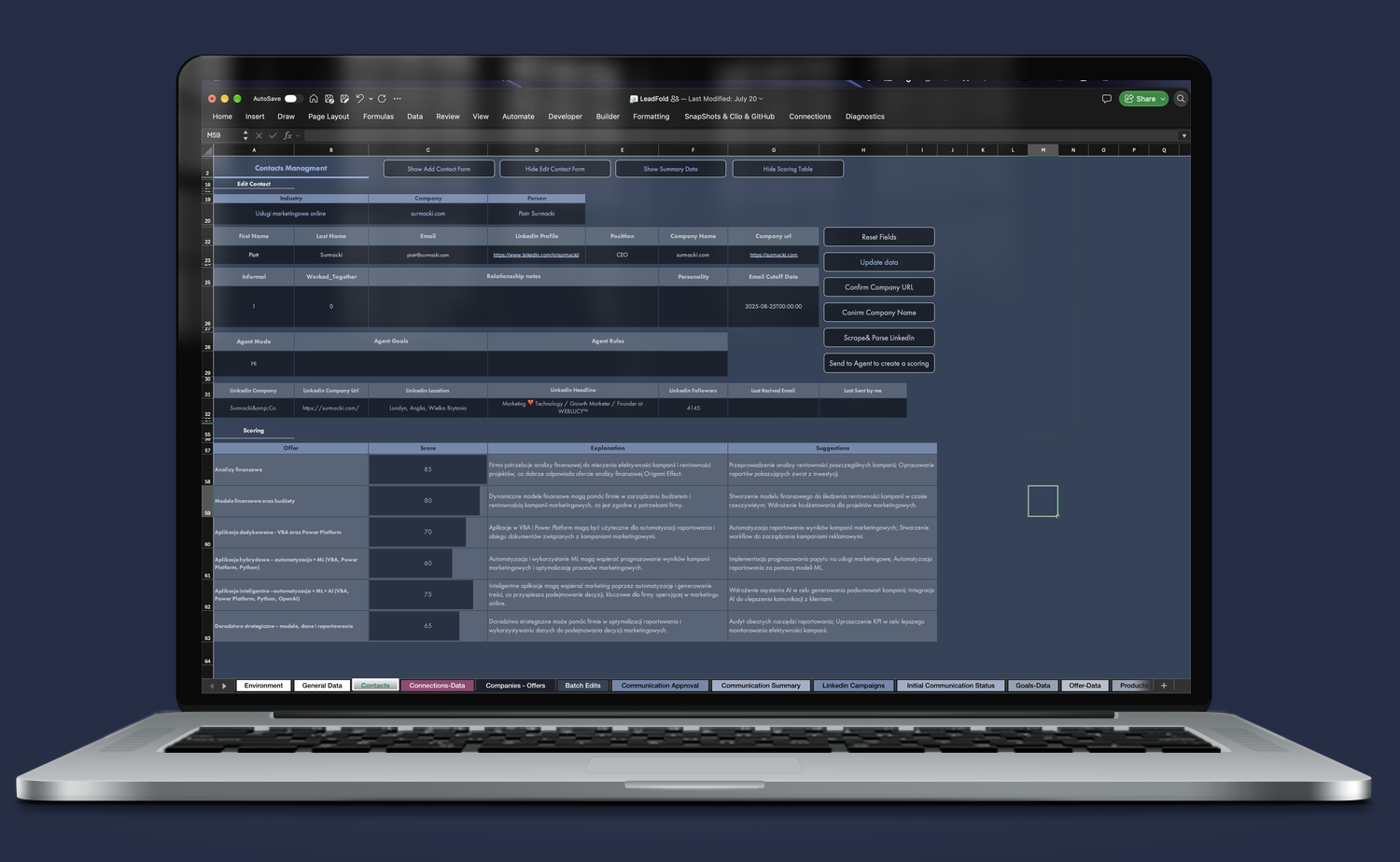
Excel gives the team access to customer data, matching results, and parameters for generating materials. It also lets them edit instructions for AI without directly changing the application code.
The spreadsheet separates what the team should be able to change independently from the technical execution of the process. Users work with data and business rules, while Python runs the automation.
Documents and presentations
Based on the selected customer, category, product, and presentation format, the system prepares DOCX and PPTX materials: offers, contracts, executive summaries, and detailed presentations.
Excel supports data management and analysis, PowerPoint presents the results, and Discord is used to moderate communications.
Approval and follow-up
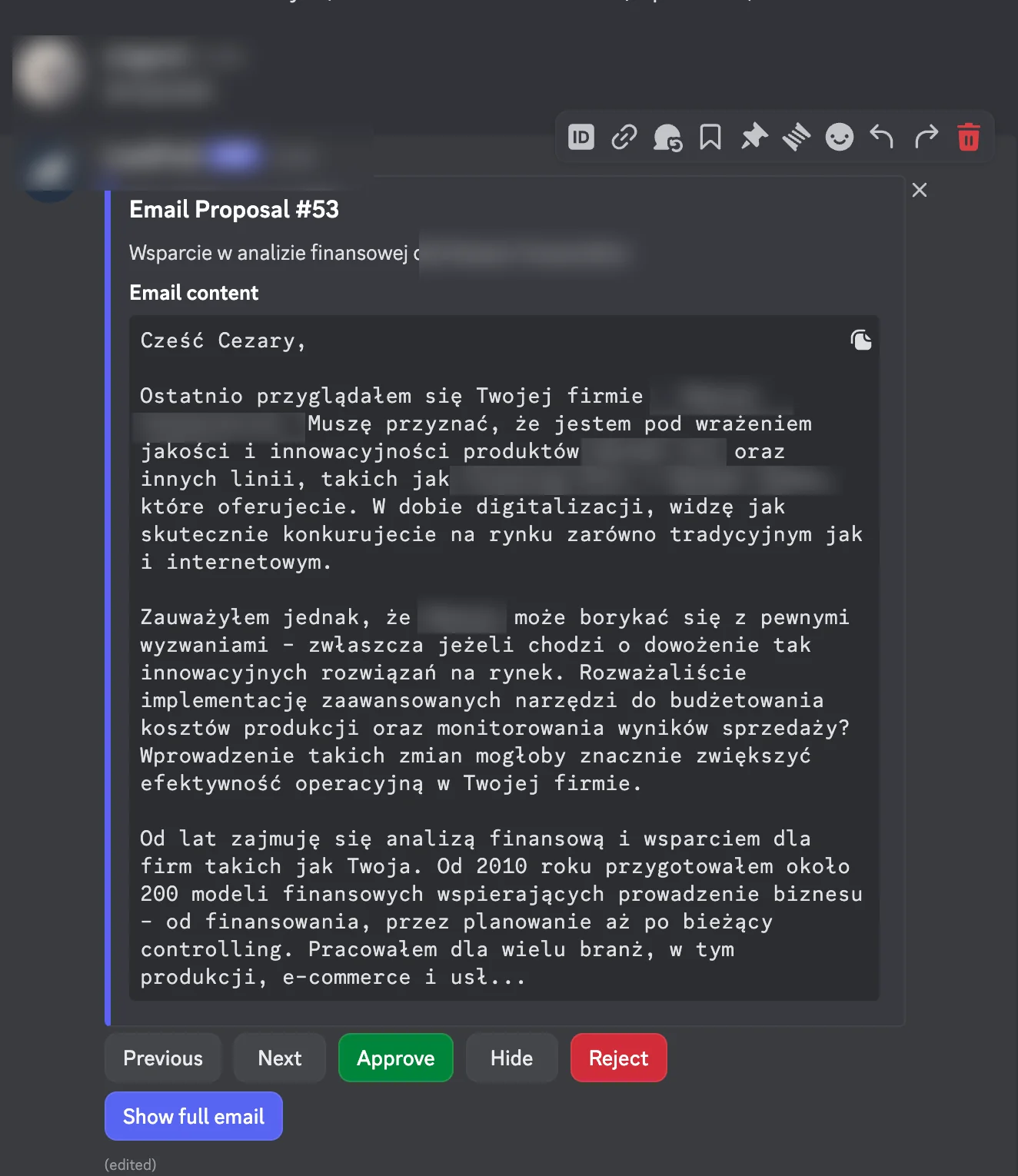
A generated message can be sent to a dedicated Discord channel. The user reviews the proposal, approves it, or sends it back for revision.
Automation covers preparation and delivery of materials for review. Sending remains a step that requires human approval.
Modules and features
From an Excel prototype to a complete sales process
Excel as a business application prototype
In LeadFold, the spreadsheet is more than a place to store tables. It is the application interface: users select a customer, check the data, review the scoring, and specify which materials should be created.
This approach makes it possible to validate how the process works first and invest in a separate interface later. The team can assess whether it sees the right information, understands AI results, and has enough control over the next steps.
Prototyping in Excel is particularly useful when business logic is still changing. It is easier to discuss a specific column, parameter, or result than an abstract specification for a future application.
A familiar tool, a shorter path to testing
The sales team does not have to start by learning a completely new environment. It can test automation using familiar data views and provide feedback on everyday work more quickly.
This helps identify missing information, unclear scoring criteria, or an unsuitable layout for results earlier. Feedback is based on a working process, not just a mockup.
Excel does not have to be the final interface for every solution. It can remain an operational tool or help define requirements for the next version of the application. The choice should depend on the scale of work, number of users, and access requirements.
A unified knowledge base of customers and offerings
LeadFold connects information about products and services with the context of a specific customer. It uses data such as industry, KRS, NIP, REGON, purchase history, NDA status, the number of signed contracts, and contact notes.
This means AI does not work solely from a general description of a service. It can relate a proposal to the customer’s situation and their existing relationship with the company.
The system enhances existing tools with analysis and automation rather than replacing CRM, Excel, or OneDrive.
Research agent and fit scoring
The research agent analyzes a potential customer’s business: its website, industry, competitors, key people’s LinkedIn profiles, and visible indicators of technological maturity.
The scoring agent uses the gathered context to assess how well the offer fits:
- Scores products and services on a scale of 0–100 points.
- Explains why a given solution may address the company’s needs.
- Prepares implementation suggestions.
- Provides talking points for the initial conversation and follow-up offer.
The score supports the salesperson; it is not a substitute for verifying the customer’s needs.
Personalized outreach messages
A starting point can be an email address or LinkedIn profile, along with a short description of the relationship with the recipient. LeadFold combines this information with company knowledge and customer data to prepare a proposed message.
Personalization includes more than the company name. It can also reflect business context, possible challenges, relevant case studies, and communication tone.
In an example from the project, the instructions included information about a long-standing acquaintance with the recipient, a business relationship, and playing Call of Duty together. The system used this context to prepare an informal message that combined a proposal to discuss automation with a personal reference.
The resulting text remains a proposal to be reviewed — especially for information about the company and the accuracy of business assumptions.
Generating offers, contracts, and presentations
The salesperson selects a customer, category, product, and material format, then starts the task. The system can prepare:
- A multi-page DOCX offer tailored to the customer’s industry and needs.
- An NDA or implementation contract populated with company details.
- A PPTX executive summary with KPIs and business benefits.
- A detailed PPTX presentation with screenshots of proposed solutions.
The delivery brief states that generating a set of materials takes 60–120 seconds, and around a minute or less for selected tasks. The user then reviews the documents, makes any necessary changes, and approves them for use.
This is generation time, not the duration of the entire sales process or document review.
Personalizing offer content
AI combines product and service descriptions with customer information. It selects solutions, explains features as benefits, adjusts the communication tone, and chooses relevant case studies.
The process also includes generating industry-specific KPIs, preparing ROI calculations based on the data and assumptions used, and filling in documents with information about the company and responsible individuals.
The calculations and conclusions require review by the team. A company profile alone is not enough to confirm the actual return on investment.
Moderating communications in Discord
LeadFold sends the generated message to a dedicated channel, for example, for email approval. The notification includes a content preview and action options.
Approve approves the message for sending, while Reject sends it back for revision. The interface shown also includes a Hide option.
After approval, the system can send the message and continue the process, for example, by tracking replies. The team does not have to manually move content between tools, while retaining control over outgoing communications.
Dynamic prompts edited in Excel
Instructions for AI are built around the specific task, lead data, industry, and interaction history. The system selects and combines the necessary context to improve the quality of responses and limit unnecessary token usage.
Prompt parameters can be modified directly in the spreadsheet. The team can change the communication tone, scope of personalization, or how data is used without involving a developer each time.
This is one of the key benefits of prototyping in Excel: people who understand the business process can refine its rules themselves, while the technical layer remains responsible for carrying out the task.
Testing variants without rebuilding the application
The spreadsheet makes it easy to compare instruction variants, such as a more formal or direct message, a different range of input data, or a different way of presenting benefits.
Variants can be prepared for A/B testing, and instructions can be adapted for subsequent language models. Editing templates and parameters in cells makes it possible to test a change without building a new application screen.
The results of these trials help determine which settings are worth retaining as the solution develops. Changing a prompt alone does not guarantee an increase in opens, replies, or sales — measurement is needed.
Supporting ongoing customer work
LeadFold’s features go beyond the first message and offer. The system analyzes the recipient’s communication style, including tone and formality, and suggests suitable replies.
It can also prepare activity summaries after a vacation, suggest priority actions, and create tasks for process participants. Bulk content generation covers emails, LinkedIn messages, and notifications.
Scaling up the work still requires quality control and rules for using data and communication channels.
Security, infrastructure, and data scope
LeadFold can run on the client’s infrastructure, including its own server. This allows local data processing to be controlled and external service integrations to be selected deliberately.
The solution uses Python, VBA, SQL, and Microsoft tools, including Power Platform. Security measures provided by integrated services may include encryption and role-based access control; their actual scope depends on the environment’s configuration. The project brief mentions, among other things, AES-256 encryption for data stored in OneDrive.
Using your own server does not mean all data stays local. Using the OpenAI API, Microsoft Graph, OneDrive, or Discord involves transferring certain information to those services. The client should control the scope of the data shared.
The project takes data minimization, moderation, and GDPR requirements into account. However, compliance for a specific deployment requires appropriate legal grounds for processing, permissions, configuration, and procedures — it does not follow from the technology alone.
Delivery outcomes
What LeadFold changes for the team
Less time preparing materials
The delivery brief compares manual offer preparation, which could take up to 4 hours, with material generation in around 60–120 seconds, or around a minute or less for selected tasks. The team moves from creating documents from scratch to reviewing and refining them.
AI-supported research
Automated company analysis and scoring reduce repetitive information gathering. The project material identifies the potential to save more than 25 minutes per contact compared with research that takes 20–30 minutes. Actual savings depend on data availability and the scope of review.
Personalization based on context
Messages and offers draw on knowledge of the customer’s business, relationship history, and service fit. The source material indicated an increase in message effectiveness from around 2–3% to 15–20%, but did not define the metric, sample, or methodology. This is the solution’s stated potential, not a confirmed result or guarantee.
Faster validation of ideas in Excel
The prototype allows the team to test the process on real sales tasks before investing in a separate application. They can check data usefulness, scoring clarity, and material quality earlier, then develop what actually helps users.
Greater team autonomy
Editing prompts and parameters in the spreadsheet shortens the path from user feedback to the next variation. Changes to communications do not have to mean rebuilding code or the interface each time.
Automation without losing control
The system prepares proposals, and a person approves communications. Moderation, the ability to make corrections, and deliberate choices about the data shared with AI combine speed with accountability for content.
Making use of existing tools
LeadFold extends the capabilities of CRM, Excel, OneDrive, PowerPoint, and Discord. The team can use automation without starting the project by replacing its entire work environment.
More time for customer conversations
Less manual copying, formatting, and document writing means more time to verify needs, prepare arguments, and build relationships. These are the activities intended to support sales effectiveness over time.
Have a process in Excel that could become a working application?
Start with a prototype: let’s test the data, logic, and usability of the automation before you invest in a more extensive system.