


Clio is a data orchestration system for automatic data integration and reporting.
When an employee approves data in a spreadsheet they know, Clio takes control — it saves it to a central database, compares it with the plan, detects deviations, and automatically generates reports, alerts, and dashboards for the entire company.
No exports. No manual merging. No extra work.
Problem — what the client was looking for
In most companies, every piece of information is entered at least twice.
The first time when the work is done — an invoice arrives, an order is fulfilled, a project starts.
The second time when someone has to report on that work. And it is this second entry that is invisible at first glance — because it doesn’t look like data entry. It looks like “making a report.”
Someone pulls data from several places. Merges it manually. Tries to understand why the numbers don’t match. Interprets what a deviation they just found means. Formats it in a way that is understandable to management. Sends the file by email. And a week later does it all over again — because the data has already become outdated.
The effect is always the same. The manager doesn’t know which version of the file is current. The analyst doesn’t know which version management is working on. No one knows if the data in last week’s presentation is still true. The report that was supposed to provide an answer — itself becomes a question.
On top of that, there is a structural problem that most companies have never explicitly named: data for a single report lives in several places at once. The budget in the finance department’s Excel. Invoices in a separate spreadsheet. Operational data somewhere else. To create one summary, someone has to manually collect, merge, and verify everything. Every month. From scratch.
This is work that should not exist. Not because it is unnecessary — conclusions are needed, interpretation is needed, the picture for management is needed. But this work should not require a person who manually glues three spreadsheets together just to be able to start thinking.
Solution — what Clio is
Clio is a data orchestration and automatic reporting system based on the Single Entry – Multi Output architecture.
One place to enter data. Multiple outputs — without extra work.
The key design decision was to leave Excel where it is.
Not because Excel is the best possible tool, but because it is the tool people already use and in which they can build complex things. Financial models, budgets, complex calculations, sales plans — all of this is created in Excel and should stay there. Changing the interface means changing the habits of the entire organization. Clio does not require that change.
The principle of operation is simple: the employee enters data in a spreadsheet they know, approves it — and Clio takes control from that moment.
The data goes to a central MongoDB database, is processed, and feeds reports, dashboards, and alerts for the entire company. No rewriting. No exports. No manual merging of presentations. Clio does not replace Excel — it makes Excel work more effectively for the entire organization.
Clio — the only system that is both Excel-friendly and management-friendly
Management wants up-to-date data, ready reports, and alerts when something requires attention. Employees want to work in a tool they know — and don’t want to do anything twice. These two requirements rarely talk to each other. Most systems solve one at the expense of the other.
Clio solves both. Data enters through the Excel that the organization already uses. It exits as management reports, dashboards, alerts, and ready documents — automatically, without involving a human as a connector.
Clio solves two fundamental problems at the same time.
Reporting — work results in spreadsheets stop living on one employee’s drive and start feeding reports for the entire organization.
Standardization — every report generated by Clio has the same format, the same structure, and reaches the right place, regardless of who and when entered the data.
Clio was not created as a product. It was created as an answer to specific questions.
The logic behind the system is based on many years of experience in financial analyses carried out for private investors and funds — in real estate projects, M&A transactions, operational profitability assessments, and investment scenario modeling.
This experience answered the question that every reporting system should ask before writing the first line of code: what information actually changes decisions? What does management need to see to take action — and what only clutters the screen? When is a deviation a signal requiring a reaction, and when is it just statistical noise?
Clio is the answer to these questions, encapsulated in an architecture. Not a generic one — tailored to a specific company, a specific process, and a specific decision-making moment.
How Clio works — system architecture
Dedicated Excel application as an active data terminal
Origami Effect builds a personalized spreadsheet tailored to the specific company’s processes, equipped with a VBA or JavaScript layer that turns it into an active data terminal. The user works exactly as before. The system does the rest.
Central MongoDB database
A flexible NoSQL database that accepts data exactly as designed — without rigid schemas or structural limitations. Each record contains not only the value but also the context: who entered it, when, and as part of which process. This is not a warehouse — it is an active engine that continuously monitors data according to defined rules and reacts when something requires attention.
Python analytical layer
Data from Excel is taken over by algorithms that generate analyses and visualizations unavailable in standard BI — density maps, violin plots, Tornado Charts, heatmaps, multi-dimensional scatter plots. Advanced visualization allows you to see in the data what a table will never show — where the market is concentrated, which variables have the greatest impact on the result, how risk is distributed across scenarios.
Data flow orchestration
Clio manages the flow of information from the moment a number is entered in a cell to the final report. Data from different sources — spreadsheets, financial models, operational applications — are merged automatically without human involvement. Each source provides one thing: reliable, up-to-date data from its area. Clio assembles the whole.
Automatic report distribution
The finished document is automatically delivered to the right place — the right folder on SharePoint, the right file name with date and version, at the right time. According to the schedule: daily, weekly, monthly, or triggered by an event. The end user doesn’t have to do anything. The report arrives by itself.
What Clio stores — a database that never sleeps
MongoDB is not a passive archive. Every record contains not only the value but also the context — who entered it, when, as part of which process, based on what assumptions. What Clio collects determines how much can be extracted from that data.
Transactional and invoicing data
Every invoice from Echo goes to the database in a structured form: what was purchased, from whom, for how much, on what date, and which process or plot it belongs to. Clio compares this data with the budget and immediately knows where a deviation occurred — without waiting for the monthly accounting summary.
Budgets and operational plans
Forecasted values from operational models go to Clio as a reference point for the entire season or year. In agriculture, these are detailed feed purchase plans broken down by type, month, and animal group. In real estate — rental forecasts, renovation budgets, occupancy plans. In every industry — departmental budgets and sales plans with version and approval date.
Investment variants and financial scenarios
MFO-class financial models generated in Artemis or Demeter — from optimistic to “black swan” scenarios — are archived in Clio with full version history. Dozens of variants, each with complete data: balance sheet, profit and loss account, cash flow, financial ratios, bank covenants, NPV, IRR.
Comparing results from different scenarios at the balance sheet or P&L level usually takes hours of copying data. In Clio, all calculated variants are placed side by side in a standardized PDF or PowerPoint report — without opening a single xlsx file. You can instantly compare how a given scenario will affect liquidity or bank covenants, and the history of all versions is available at any time.
Operational data
Recorded events from current operations: agrotechnical treatments, plant protection records, herd status, milk data, inspection protocols. Every event recorded with date, operator, location, and context — ready for automatic documentation and anomaly analysis.
History of alerts and reports
Every detected alert is saved with full context: what the system detected, when, based on what data, and to whom it sent the notification. Every generated report is archived with metadata — when it was created, on what data, in which template version, and where it went. Full traceability without logging into the system.
Business scenario versioning — dozens of variants, one click
In the classic approach, comparing ten variants of company development means ten separate files — or one huge, slow spreadsheet whose last modification date and author are unknown.
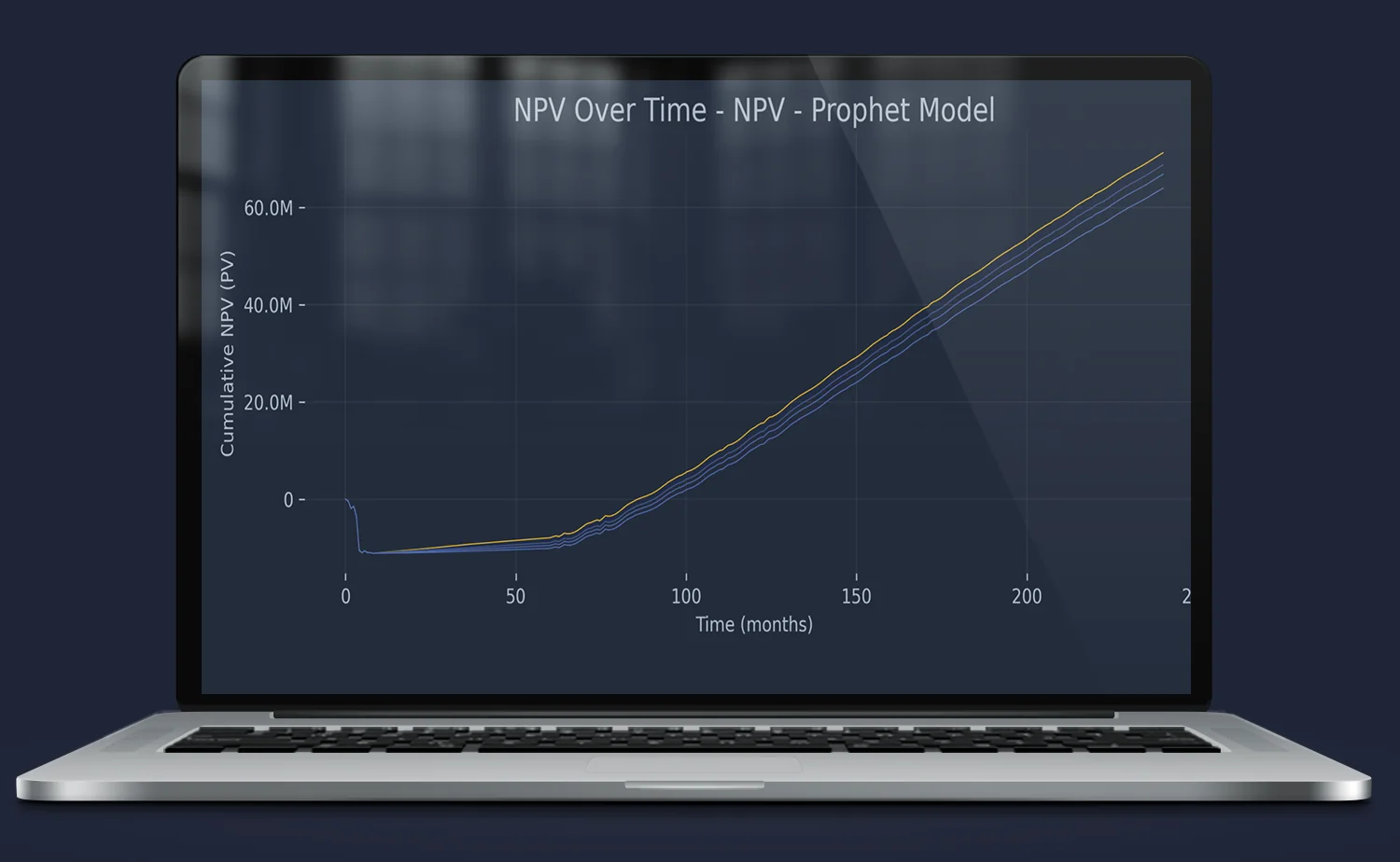
Clio solves this differently. The Artemis model becomes a scenario engine. You change the input parameters — cost of capital, revenue growth rate, assumptions about occupancy or raw material prices — approve it, and Clio saves that variant to the database with a full timestamp, author, and set of parameters. In a matter of minutes, you can have dozens of archived variants: from the base scenario through optimistic to stress test and “black swan.”
What problems this solves
First problem: lack of decision history. How do you know why variant B was chosen over A three months ago? In the classic approach — you don’t. The file was overwritten or lost in an email inbox. In Clio, every approved scenario is an immutable record with date, author, and full input data. You can go back to any moment and see exactly what was calculated and on what assumptions.
Second problem: inability to compare quickly. Compiling NPV, IRR, and cash flow for eight variants at the P&L level usually takes several hours of copying data between files. Clio automatically places all calculated variants side by side — in a standardized PDF or PowerPoint report, without opening a single xlsx file.
Third problem: investment risk invisible in a table. The DCF Tornado Chart generated by Clio based on data from Artemis precisely shows which variables — raw material costs, sales dynamics, discount rate — have the greatest impact on valuation. This is a visualization that not only looks professional in an investor meeting — above all, it explains where the real risk lies in the model before anyone decides on capital allocation.
Data that connects itself — forecast, reality, and AI in one place
The milk production forecast from Demeter takes into account herd feeding standards, planned feed rations, and seasonality of yield.
These are numbers that someone carefully calculated — and which until now lived in the model, separately from what was really happening.
Actual milk sales are recorded by Echo
every sales invoice goes to the database with date, quantity, price, and recipient.
Clio automatically connects these three streams.
No exports. No manual compilation in a new spreadsheet. No wondering if the data is up to date. The moment an employee approves an invoice in Echo — the picture of feed budget execution and sales forecast realization updates at the same moment.
The owner sees not only whether milk is selling according to plan — but also whether feed consumption is at a level justified by that production. A deviation is visible before it affects the month’s financial result. An alert appears before anyone even asks.
This is ready for AI.
Three connected data streams — forecast from Demeter, sales and costs from Echo, operational herd data — cleaned, structured, and consistent in one MongoDB database, is exactly the foundation an AI agent needs to answer questions without guessing.
The manager asks: “why is the milk margin falling even though production is on plan?” The agent checks the sales price to feed cost ratio over the last eight weeks, identifies the increase in silage cost from Echo invoices, and answers directly — with numbers, dates, and source. No opening files. No asking anyone for a compilation.
Clio not only connects data. It makes the data ready for conversation.
Alert system — Clio does not wait for someone to notice a problem
Clio is a layer that continuously monitors data and reacts when something requires attention — before it affects report quality or decision-making. Alert logic is defined for the specific company and specific processes.
Downward trend — a product or category begins to lose momentum. Alert before it becomes visible in the monthly report. Missing data — someone did not enter data by the required deadline. The system signals the gap before it affects report quality. Threshold breach — budget, margin, occupancy, or other indicator exceeds defined limits. Immediate alert. Anomaly — data deviates from historical pattern. Clio detects and reports before anyone asks. Expiring deadlines — lease agreement, insurance policy, legally required documentation — Clio monitors deadlines for the entire portfolio.
The alert goes where the person is: Discord, WhatsApp, Slack, Microsoft Teams, email.
Output formats
Clio generates documents in formats tailored to the recipient and purpose.
PowerPoint — management reports with company branding, ready for presentation. Charts, comments, formatting — everything automatically filled with current data. The template is created once, data updates with every reporting cycle.
PDF — reports for archiving, external distribution, and printing. Fixed format, professional appearance, full documentation ready for audit or inspection.
Excel — detailed summaries for controlling and finance in a fixed format that does not change between months. The analyst receives data ready for further work — without manual importing and cleaning.
SharePoint — every generated document is automatically placed in the right location with the right file name and date. No manual uploading, no notifying recipients — they receive a notification through their channel.
SVG — advanced vector visualizations generated by Python: DCF Tornado Chart, density maps, risk distributions. Charts that look perfect at any resolution — on screen, in print, and in investor presentations.
Ready library of patterns — you don’t start from scratch
Clio is not a blank sheet that needs to be designed from the ground up. The system contains a library of visualization patterns, KPI indicators, and alert templates — built over years of financial analysis work for private investors and funds.
During implementation, the client chooses what and how should be presented — from a ready set of proven solutions. Which indicators should go to management and which to the operational department. Which charts best show the cost structure in that specific industry. When a deviation is information and when it is an alert requiring immediate reaction.
These are not templates taken out of thin air.
Every visualization pattern and every alert logic is backed by a specific decision-making situation — the moment an investor asked about profitability with changing financing costs, when a fund needed to see risk distribution across scenarios, when an owner wanted to know in five minutes whether the business was heading in the right direction.
The library grows with every implementation. What works in one industry — after adaptation — goes to the next. The client does not pay for designing from scratch. They pay for adapting a proven solution to their process.
Each module does what it does best.
Excel calculates with full formula transparency. MongoDB database stores and orchestrates. The language model interprets and communicates. This architecture minimizes the probabilistic nature of AI — and that is exactly why the answers coming out of it can be trusted.
A purchaser asks “will I stay within the feed budget until the end of the quarter” — the agent checks invoices and forecasts and answers directly with a specific amount. The owner asks “how is the business going” — the agent decides for itself whether to look at milk data, crops, or purchases and synthesizes one coherent picture of the entire company. Every answer is based on data from a specific export, with a specific date and source. The owner knows not only what the agent answered — but where it came from.
Clio is not just a reporting system. It is the first step toward a company that learns from its own data.
Implementation effect
- Data from scattered spreadsheets in one database — up-to-date at the moment of employee approval, not after month-end closing
- Information delay reduced from days or weeks to seconds
- Reporting ceases to be a separate activity — interpretation begins where data collection used to end
- Automatic alerts about deviations before they become visible in periodic reports
- Dozens of investment variants archived with full history — comparable without opening a single file
- Standardization of formats — every report has the same structure regardless of who and when entered the data
- Ready data foundation for AI agents and RAG systems from day one of implementation
- Zero exports, zero manual merging, zero waiting for a report that someone has to prepare
FAQ
Does Clio replace Excel?
No. Clio deliberately keeps Excel as the working interface. Users work in the tool they know. Clio takes over the data at the moment of approval and performs all distribution and analytical work automatically — without changing the organization’s habits.
How does Clio differ from standard BI tools?
Standard BI tools show data that someone previously exported and loaded. Clio eliminates this step — data reaches the database at the moment of approval by the operational employee and immediately feeds all outputs. There is no on-demand reporting here. There is a picture of the company that simply exists.
Is Clio a ready-to-download product?
No. Clio is customized for a specific company. Origami Effect analyzes the data flow in the organization and designs a solution that fits into it — not the other way around. This is the difference between a program and a solution.
Do employees have to learn anything?
The interface is still Excel — the tool they know. Only what happens after data approval changes. Training concerns only the new elements of the spreadsheet and usually takes 1–2 hours.
Does Clio work only with Excel data?
Clio accepts data from all tools in the Origami Effect ecosystem based on MS Excel such as: Echo, Demeter, Artemis, Gaia, Hebe, as well as analytical systems like Quantis or Orbis. Excel is the main input interface, but the MongoDB architecture allows integration with any external data sources.
Can Clio be expanded?
Yes. The MongoDB architecture and the modularity of the ecosystem allow for gradual addition of new data sources, output formats, and alert rules — without rebuilding the existing system.
Are Clio data available via API?
Clio is not an API service — it is a system that itself delivers the right output to the right recipient at the right time. The report lands on SharePoint or Email before anyone asks for it. The alert lands on WhatsApp before anyone notices the problem. The dashboard updates the moment an employee approves the data. This is the goal for which Clio was created.
An API layer can be built on top of the ecosystem as a separate integration — for example, when a company wants to connect an external ERP system or an AI agent that queries the database in real time. But this is an extension, not the core. The core is the right information to the right person at the right moment — automatically.
Where does the alert logic and visualization patterns in Clio come from?
From many years of financial analysis work for private investors and funds. Every KPI pattern, every alert logic, and every type of visualization is backed by a specific decision-making situation — not theory. What makes it into the Clio library has passed the reality test: did this information, presented this way, at this moment — change a decision? If yes, it stays. If not — it is discarded.
During implementation, the client does not design the system from scratch. They choose from a ready set of proven solutions and adapt them to their process. This shortens implementation and eliminates the risk that the system will collect data that no one reads.
Do you need someone who instantly understands the problem — and knows what to do with it?
Most companies have data. What is missing is the idea of what to do with it — and someone who will actually execute it. Origami Effect provides both.